
WordPress powers millions of websites, making it one of the most widely used content management systems in the world. Its popularity also makes WordPress websites a frequent target for attackers.
But a hacked WordPress website doesn't always look hacked.
Sometimes the website continues to load normally while hidden PHP files, backdoors, spam pages, malicious redirects, or unauthorised scripts operate in the background.
At Myriad Solutionz, we've worked on WordPress websites affected by different forms of malware. Across these incidents, we've seen recurring patterns—from hidden backdoors and malicious plugins to SEO spam, cache manipulation, and web shells.
This article looks at nine malware patterns we've encountered during WordPress investigations, what makes them dangerous, and what website owners can do to reduce the risk of infection and reinfection.
Why Do WordPress Websites Get Infected?
WordPress itself is not necessarily the cause of an infection. In many cases, attackers take advantage of weaknesses in the surrounding website environment.
Common entry points include:
- Outdated WordPress core, plugins, or themes
- Vulnerable plugin or theme versions
- Compromised administrator credentials
- Weak passwords
- Poorly secured hosting environments
- Incorrect file permissions
- Pirated or nulled themes and plugins
- Unmaintained websites
Even widely used and reputable plugins can occasionally contain security vulnerabilities. Once a vulnerability is discovered, developers may release a security update. Websites that remain on vulnerable versions can become targets for automated attacks.
After gaining access, attackers may install one or more mechanisms that allow them to maintain access, modify content, create spam, or reinfect the website.
1. Hidden Backdoor Malware
One of the most common patterns we've encountered is the hidden PHP backdoor.
Backdoors are designed to give attackers continued access to a website without requiring them to repeat the original attack.
They can be disguised within existing files or introduced as new PHP files that appear unrelated to the website.
Illustrative example of a pattern commonly investigated during malware analysis:
<?php
// Example indicators commonly investigated during a malware scan
$suspicious_functions = [
    'eval',
    'assert',
    'system',
    'exec',
    'shell_exec',
    'passthru',
    'base64_decode'
];

// Combinations of these functions,
// especially alongside encoded or external data,
// may require further investigation.
The presence of one of these functions does not automatically mean a file is malicious. Some legitimate applications use functions that security tools may also flag.
The concern arises when unusual combinations appear alongside obfuscated code, unexpected file modifications, or external input.
Common warning signs
- Repeated reinfection after cleanup
- Unknown PHP files
- Unexpected administrator accounts
- Modified WordPress core files
- Security tools repeatedly detecting the same infection
What needs to happen?
Removing one suspicious file is rarely enough. A proper cleanup should include checking the filesystem, database, administrator accounts, scheduled tasks, plugins, themes, and server configuration.
2. Malicious Plugins and Fake Extensions
Plugins are one of the defining features of WordPress, but they can also become an attack surface.
During investigations, we've encountered suspicious plugins or plugin archives that were not part of the website's expected setup.
Important:
A popular plugin isn't automatically dangerous simply because vulnerabilities have been discovered in it.
Even widely used plugins can occasionally contain security vulnerabilities. The risk increases when a vulnerable version remains installed after a security update becomes available, or when a plugin installation has been modified by an attacker.
Malicious or compromised plugins may be used to:
- Create backdoors
- Modify website content
- Create administrator accounts
- Load additional malware
- Redirect visitors
- Alter existing website files
Illustrative example of a pattern commonly investigated during malware analysis:
<?php
$plugins = get_plugins();

foreach ($plugins as $plugin => $details) {
    echo $plugin . " — " . $details['Name'] . PHP_EOL;
}
During an investigation, installed plugins can be compared against the website's approved plugin inventory, known versions, file integrity, and recent changes.
Prevention
Keep plugins updated, remove extensions that are no longer required, and investigate unexpected plugin installations or modifications.
3. Remote Payload Downloaders
Some malware does not contain its complete malicious payload within the infected file.
Instead, it retrieves additional content from an external source.
Illustrative example of a pattern commonly investigated during malware analysis:
<?php
// Suspicious pattern:
// External data is retrieved and then passed
// into dynamic execution logic.

$remote_data = get_external_data($unknown_source);

if ($remote_data) {
    execute_dynamic_code($remote_data);
}
This type of behaviour can make an infection more difficult to investigate because the malicious payload can change independently of the original infected file.
For example, an attacker may use the same compromised file to retrieve different payloads at different times.
Lesson learned:
Finding and deleting the downloaded payload is not enough if the mechanism responsible for retrieving it remains on the website.
4. SEO Spam Malware
SEO spam is one of the most visible consequences of a WordPress infection—although website owners may not notice it immediately.
Attackers can inject pages, posts, links, or database content designed to rank for unrelated search terms.
These may include:
- Gambling
- Pharmaceuticals
- Betting
- Adult content
- Counterfeit products
- Other unrelated commercial keywords
Illustrative example of a pattern commonly investigated during malware analysis:
SELECT ID, post_title, post_status
FROM wp_posts
WHERE post_content REGEXP
'casino|viagra|pharmacy|betting|poker'
ORDER BY ID DESC;
Security teams can also investigate suspicious page slugs:
SELECT ID, post_name, post_status
FROM wp_posts
WHERE post_name REGEXP
'casino|viagra|pharma|betting|poker';
These searches are illustrative examples, not proof that matching content is malicious. Legitimate websites can naturally contain some of these terms.
The bigger concern is unexpected content that suddenly appears in large quantities or does not belong to the website.
Why SEO spam is dangerous
A compromised website may experience:
- Loss of organic visibility
- Spam URLs appearing in Google
- Damaged brand reputation
- Security warnings
- Reduced organic traffic
Google Search Console should therefore be part of regular website monitoring.
5. Cache Manipulation and Spam Content
This is one of the more interesting behaviours we've encountered.
Some malware is designed to clear website caches after modifying website content or generating spam pages.
The objective is simple: make the newly injected content visible immediately.
Malicious scripts may interact with caching systems such as:
- LiteSpeed Cache
- WP Rocket
- W3 Total Cache
- WP Super Cache
- Object Cache
- OPcache
- Disk Cache
      wp-content/cache/

      wp-content/litespeed/

      wp-content/cache/minify/

      wp-content/cache/page_enhanced/

      wp-content/cache/object/

      wp-content/cache/db/

      wp-content/cache/autoptimize/

      wp-content/uploads/cache/

      wp-content/uploads/litespeed/
The behaviour can follow a pattern such as:
Malicious script
↓
Creates or modifies spam content
↓
Cache is cleared or invalidated
↓
WordPress regenerates the page
↓
New malicious content becomes visible
↓
Search engine may crawl the modified page
Repeated unexplained cache clearing alongside unexpected content changes can therefore be an important clue during a malware investigation.
6. Fake WordPress Core Files
Attackers sometimes use filenames that resemble legitimate WordPress files.
This can make malicious files easier to overlook during a quick inspection.
A useful defensive check is WordPress's built-in core checksum verification.
wp core verify-checksums
Clean WordPress core
↓
Compare files + checksums
↓
Unexpected modification detected
↓
Investigate the file
↓
Replace with a verified clean copy if required
A suspicious filename alone doesn't prove that a file is malicious. File location, contents, modification history, and integrity checks should all be considered.
7. Obfuscated PHP Malware
Obfuscation is another recurring challenge during WordPress malware investigations.
Attackers may intentionally make PHP code difficult to read by encoding strings, hiding function names, or dynamically constructing code.
Illustrative example of a pattern commonly investigated during malware analysis:
<?php
// Encoded data
$encoded = '...';

// Decoding
$decoded = base64_decode($encoded);

// Dynamic execution pattern
$function = '...';
$function($decoded);
Again, functions such as base64_decode() are not inherently malicious. Developers may legitimately use them.
The concern comes from how these functions are used, particularly when encoding, decoding, dynamic execution, external input, and unexplained file modifications appear together.
This is why malware analysis cannot rely on a single keyword or function.
8. File Manager Web Shells
A web shell can give an attacker a way to interact with a compromised website through a browser.
In WordPress investigations, a malicious PHP file may effectively provide capabilities similar to a file manager, allowing an attacker to interact with files on the server.
Depending on the implementation, attackers may be able to:
- Browse files
- Upload additional malware
- Modify existing files
- Delete files
- Execute server-side actions
Incoming HTTP request
↓
PHP file receives attacker input
↓
Input is processed
↓
Server files are accessed
↓
Files may be uploaded or modified
↓
Additional malicious actions occur
A defensive investigation can also look for recently modified PHP files:
find . -type f -name "*.php" -mtime -7 -printThis command does not identify malware by itself. It simply helps investigators locate recently modified PHP files that may require further review.
9. Multiple Malware Infections in a Single Website
Perhaps the most important lesson from real WordPress cleanup work is that one infection does not necessarily mean one malicious file.
A compromised website may contain several mechanisms at the same time.
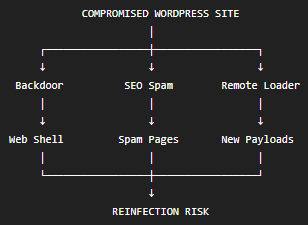
A complete investigation should therefore examine:
✓ WordPress core integrity
✓ Plugin and theme integrity
✓ PHP files
✓ wp-content/uploads/
✓ wp-content/cache/
✓ Database content
✓ Administrator accounts
✓ Scheduled tasks / cron jobs
✓ .htaccess and server configuration
✓ Outbound connections
✓ Recently modified files
This is why simply deleting the file that triggered a security warning may not permanently resolve an infection.
Warning Signs That Your WordPress Website May Be Infected
Malware can remain hidden for a considerable period before producing obvious symptoms.
Watch for:
- Unexpected redirects
- Unknown administrator accounts
- Unfamiliar PHP files
- Spam pages appearing in Google
- Sudden unexplained SEO changes
- Google security warnings
- Unexpected changes to website content
- Repeated malware detections
- Unusual server activity
- Frequent unexplained cache clearing
- Website reinfection after an earlier cleanup
Security reminder:
The earlier an infection is identified, the easier it is generally to contain and investigate.
How to Prevent WordPress Malware
There is no single plugin or security setting that guarantees a WordPress website will never be compromised.
A stronger approach combines several layers of protection.
Keep WordPress Updated
Keep WordPress core, plugins, and themes updated. Security updates should be applied promptly, particularly when they address known vulnerabilities.
Use Strong Authentication
Use strong passwords and enable multi-factor authentication for administrator accounts wherever possible.
Remove Unnecessary Components
Unused plugins and themes increase the number of components that need to be maintained and monitored.
Maintain Reliable Backups
Maintain regular backups and, importantly, verify that those backups can actually be restored.
Monitor the Website
Regularly review administrator accounts, file changes, database content, Search Console alerts, and security scans.
Use Secure Hosting
Hosting configuration and server-level security are also important parts of WordPress security.
Don't Ignore Reinfection
If malware returns after cleanup, don't simply remove the same file again. Reinfection often indicates that another backdoor, compromised credential, vulnerable component, or persistence mechanism remains.
How Myriad Solutionz Helps With WordPress Malware
Recovering a hacked WordPress website is more than deleting suspicious files.
At Myriad Solutionz, our approach focuses on identifying the infection, investigating how it persisted, removing malicious components, and strengthening the website to reduce the likelihood of reinfection.
Our WordPress-related services include:
- WordPress Malware Detection & Removal
- Hacked Website Recovery
- WordPress Security Hardening
- Plugin & Theme Maintenance
- Vulnerability Assessment
- Website Performance Optimisation
- Search Console Security Recovery
- Ongoing WordPress Maintenance
The objective isn't simply to make the website work again. It is to understand how the compromise happened and what needs to change to prevent the same problem from happening again.
Final Thoughts
The WordPress malware incidents we've encountered demonstrate one important reality: a compromised website is rarely as simple as one malicious file.
Backdoors can provide persistent access. Remote loaders can introduce additional payloads. SEO spam can damage search visibility. Web shells can give attackers control over website files. Cache manipulation can make newly injected content visible almost immediately.
That's why effective malware removal requires a complete investigation rather than simply deleting the most obvious suspicious file.
WordPress security is also an ongoing process. Keeping software updated, monitoring changes, securing administrator accounts, maintaining reliable backups, and investigating unusual behaviour can significantly reduce the risk of serious infections.
At Myriad Solutionz, we help businesses investigate, recover, secure, and maintain WordPress websites so their online presence remains reliable, secure, and resilient.